Extract EdgeX Message Bus Metadata Using the Meta Function
When EdgeX Foundry publishes device readings to the message bus, events include metadata such as creation timestamps, device identifiers, and correlation tags. This guide describes how to extract event and reading metadata using the rekuiper meta() function.
EdgeX Message Bus Data Model
EdgeX Foundry packages device data into hierarchical Event structures containing metadata and an array of Reading objects:
- Event Structure:
ID: Event identifier.DeviceName: Name of the originating device.ProfileName: Associated device profile name.SourceName: Source command or event name.Origin: Nanosecond timestamp recorded at creation.Tags: Key-value metadata tags.Readings: Array of sensor values:Id: Reading identifier.Origin: Reading timestamp.DeviceName: Sensor device name.ResourceName: Sensor metric name (for example:temperature).ProfileName: Metric profile name.ValueType: Data type identifier.Value: Sensor reading value.
Schema Changes in EdgeX v2
When migrating from EdgeX v1:
- EdgeX v2 removes the
Pushed,Created, andModifiedmetadata fields. - The
Devicefield is renamed toDeviceNamein both events and readings. - The
Namefield of readings is renamed toResourceName.
EdgeX Metadata Resolution in rekuiper
rekuiper ingests EdgeX bus events and maps top-level sensor values directly to stream columns. The engine preserves event and reading metadata inside an internal tuple accessible through meta().
- Define an EdgeX stream named
events:

- When devices publish events to the message bus:
- Metric values (
temperature,humidity) become queryable columns. - Event and reading headers become metadata attributes.
- Metric values (
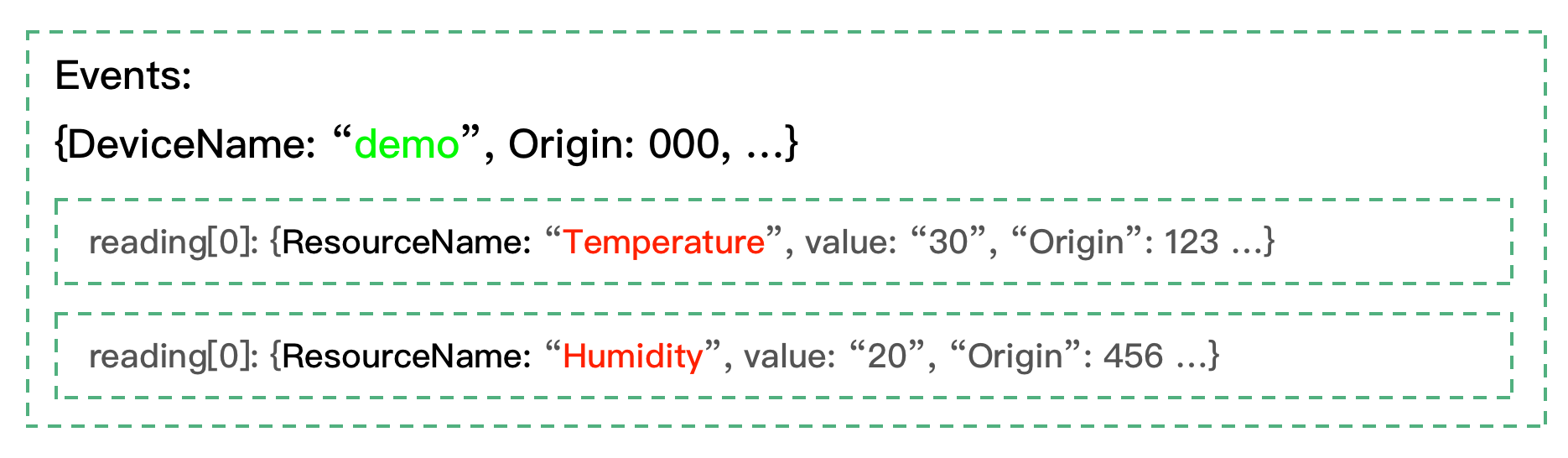
- Query columns and extract metadata attributes in SQL:

Extracting Event-Level Metadata
Pass the field name directly into meta():
meta(deviceName): ReturnsDeviceNamefrom theEventheader.meta(origin): ReturnsOrigincreation timestamp from theEventheader.
Extracting Reading-Level Metadata
Extract reading metadata using the arrow syntax: reading_name -> property:
meta(temperature -> origin): ReturnsOriginfor thetemperaturereading.meta(humidity -> id): Returns readingIdfor thehumidityreading.
Assigning Column Aliases in SELECT Clauses
When extracting multiple metadata fields in the SELECT clause, assign explicit column aliases using AS to prevent field name collisions:
SELECT
  temperature,
  humidity,
  meta(id) AS eid,
  meta(origin) AS eo,
  meta(temperature->id) AS tid,
  meta(temperature->origin) AS torigin,
  meta(Humidity->deviceName) AS hdevice,
  meta(Humidity->profileName) AS hprofile
FROM demo
WHERE meta(deviceName) = "demo2"
Available Metadata Keys
Event Metadata Fields
id, deviceName, profileName, sourceName, origin, tags, correlationid.
Reading Metadata Fields
id, deviceName, profileName, origin, valueType.