Actuate EdgeX Devices Using the rekuiper Rules Engine
This tutorial describes how to actuate EdgeX Foundry devices based on streaming rules in rekuiper. The walkthrough uses the EdgeX virtual device service (device-virtual) to receive automated commands.
Architecture and Scenario
An EdgeX application service routes incoming telemetry to rekuiper. When incoming sensor records satisfy rule conditions, rekuiper dispatches command requests back to the EdgeX Core Command service to actuate downstream devices.
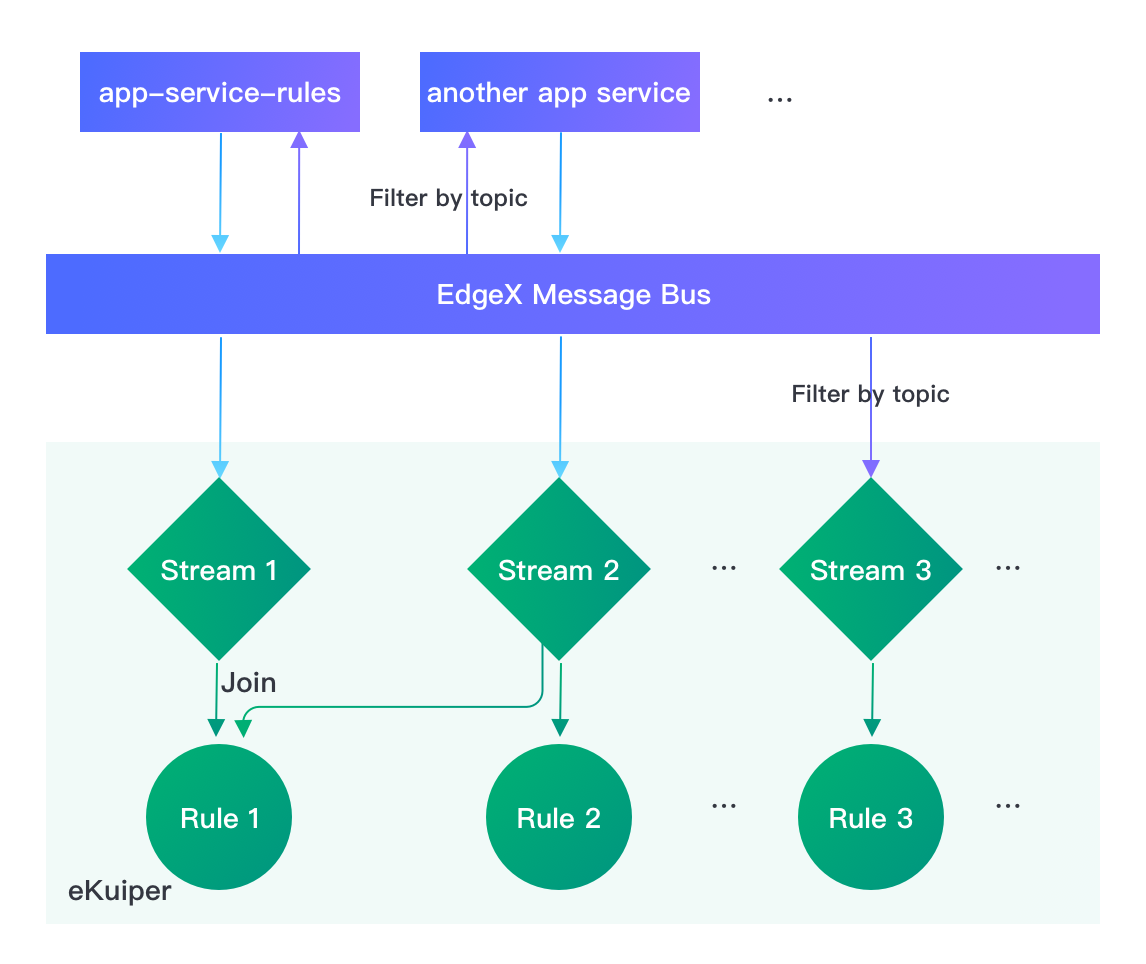
Use Case Scenarios
This tutorial configures two automated actuation rules:
- Rule 1: Monitor
Random-UnsignedInteger-Device. When a reading hasuint8 > 20, send a command toRandom-Boolean-Deviceto enable random generation (EnableRandomization_Bool = true). - Rule 2: Monitor
Random-Integer-Device. When the averageint8reading exceeds0over a 20-second tumbling window, send a command toRandom-Boolean-Deviceto disable random generation (EnableRandomization_Bool = false).
Prerequisites
Before continuing, verify that:
- EdgeX Foundry runs with the virtual device service enabled. Refer to the EdgeX Quick Start.
- rekuiper is running and connected to EdgeX. Refer to the EdgeX Rules Engine Tutorial.
Create the EdgeX Stream
Create an EdgeX stream named demo if it does not already exist:
curl -X POST \
  http://localhost:59720/streams \
  -H 'Content-Type: application/json' \
  -d '{"sql": "create stream demo() WITH (FORMAT=\"JSON\", TYPE=\"edgex\")"}'
Discover Device Command Endpoints
Query the EdgeX Core Command service to discover available actuation commands for Random-Boolean-Device:
curl http://127.0.0.1:59882/api/v2/device/name/Random-Boolean-Device | jqExample response:
{
  "apiVersion": "v2",
  "statusCode": 200,
  "deviceCoreCommand": {
    "deviceName": "Random-Boolean-Device",
    "profileName": "Random-Boolean-Device",
    "coreCommands": [
      {
        "name": "WriteBoolValue",
        "set": true,
        "path": "/api/v2/device/name/Random-Boolean-Device/WriteBoolValue",
        "url": "http://edgex-core-command:59882",
        "parameters": [
          {
            "resourceName": "Bool",
            "valueType": "Bool"
          },
          {
            "resourceName": "EnableRandomization_Bool",
            "valueType": "Bool"
          }
        ]
      }
    ]
  }
}
Test actuating the command endpoint manually using curl:
curl -X PUT \
  http://edgex-core-command:59882/api/v2/device/name/Random-Boolean-Device/WriteBoolValue \
  -H 'Content-Type: application/json' \
  -d '{"Bool":"true", "EnableRandomization_Bool": "true"}'
Configure Rules
Rule 1: Enable Random Generation on High Values
Option A: Command via REST Sink
curl -X POST \
  http://localhost:59720/rules \
  -H 'Content-Type: application/json' \
  -d '{
  "id": "rule1",
  "sql": "SELECT uint8 FROM demo WHERE uint8 > 20",
  "actions": [
    {
      "rest": {
        "url": "http://edgex-core-command:59882/api/v2/device/name/Random-Boolean-Device/WriteBoolValue",
        "method": "put",
        "dataTemplate": "{\"Bool\":\"true\", \"EnableRandomization_Bool\": \"true\"}",
        "sendSingle": true
      }
    },
    {
      "log": {}
    }
  ]
}'
Option B: Command via Asynchronous MQTT Messaging
Set EdgeX Core Command environment variables:
MESSAGEQUEUE_EXTERNAL_ENABLED=trueMESSAGEQUEUE_EXTERNAL_URL=tcp://mqtt-server:1883
Create the rule with an MQTT action pointing to the command topic:
{
  "id": "rule1_mqtt",
  "sql": "SELECT uint8 FROM demo WHERE uint8 > 20",
  "actions": [
    {
      "mqtt": {
        "server": "tcp://mqtt-server:1883",
        "topic": "edgex/command/request/Random-Boolean-Device/WriteBoolValue/set",
        "dataTemplate": "{\"ApiVersion\": \"v2\", \"contentType\": \"application/json\", \"CorrelationID\": \"14a42ea6-c394-41c3-8bcd-a29b9f5e6840\", \"RequestId\": \"e6e8a2f4-eb14-4649-9e2b-175247911380\", \"Payload\": \"eyJCb29sIjogInRydWUiLCAiRW5hYmxlUmFuZG9taXphdGlvbl9Cb29sIjogInRydWUifQ==\"}"
      }
    },
    {
      "log": {}
    }
  ]
}
The payload is a base64-encoded representation of:
{"Bool":"true", "EnableRandomization_Bool": "true"}The Core Command service publishes responses to edgex/command/response/#:
{
  "ReceivedTopic": "edgex/device/command/response/device-virtual/Random-Boolean-Device/WriteBoolValue/set",
  "CorrelationID": "14a42ea6-c394-41c3-8bcd-a29b9f5e6840",
  "ApiVersion": "v2",
  "RequestID": "e6e8a2f4-eb14-4649-9e2b-175247911380",
  "ErrorCode": 0,
  "Payload": null,
  "ContentType": "application/json",
  "QueryParams": {}
}
Rule 2: Disable Random Generation on Positive Moving Average
Option A: Command via REST Sink
curl -X POST \
  http://localhost:59720/rules \
  -H 'Content-Type: application/json' \
  -d '{
  "id": "rule2",
  "sql": "SELECT avg(int8) AS avg_int8 FROM demo WHERE int8 != nil GROUP BY TUMBLINGWINDOW(ss, 20) HAVING avg(int8) > 0",
  "actions": [
    {
      "rest": {
        "url": "http://edgex-core-command:59882/api/v2/device/name/Random-Boolean-Device/WriteBoolValue",
        "method": "put",
        "dataTemplate": "{\"Bool\":\"false\", \"EnableRandomization_Bool\": \"false\"}",
        "sendSingle": true
      }
    },
    {
      "log": {}
    }
  ]
}'
Option B: Command via Asynchronous MQTT Messaging
{
  "id": "rule2_mqtt",
  "sql": "SELECT avg(int8) AS avg_int8 FROM demo WHERE int8 != nil GROUP BY TUMBLINGWINDOW(ss, 20) HAVING avg(int8) > 0",
  "actions": [
    {
      "mqtt": {
        "server": "tcp://mqtt-server:1883",
        "topic": "edgex/command/request/Random-Boolean-Device/WriteBoolValue/set",
        "dataTemplate": "{\"ApiVersion\": \"v2\", \"contentType\": \"application/json\", \"CorrelationID\": \"14a42ea6-c394-41c3-8bcd-a29b9f5e6840\", \"RequestId\": \"e6e8a2f4-eb14-4649-9e2b-175247911380\", \"Payload\": \"eyJCb29sIjogImZhbHNlIiwgIkVuYWJsZVJhbmRvbWl6YXRpb25fQm9vbCI6ICJmYWxzZSJ9\"}"
      }
    },
    {
      "log": {}
    }
  ]
}
Monitor Execution and Verify Commands
Monitor container logs to verify trigger firings and command invocations:
docker logs -f edgex-kuiperFormat Dynamic Parameters with Templates
To inject calculated values into actuation payloads dynamically, use Go template syntax in dataTemplate:
"dataTemplate": "{\"value\": {{.int8}}, \"EnableRandomization_Bool\": \"{{.randomization}}\"}"For iterative actions and condition blocks, refer to the Data Template Guide.