Configure Data Flows from EdgeX to rekuiper
rekuiper ingests data from EdgeX Foundry through stream definitions. The EdgeX Source Guide defines properties that control how data flows from EdgeX into rekuiper. This tutorial demonstrates common architectural patterns and shows how to configure sources for each flow.
Common Ingestion Architectures
There are two primary data flow architectures between EdgeX and rekuiper:
- Ingestion via EdgeX Application Service: Downstream of Core Data, an application service transforms, filters, and formats records before publishing them to rekuiper.
- Direct Ingestion via EdgeX Message Bus: rekuiper subscribes directly to the EdgeX message bus to process raw telemetry with minimum latency.
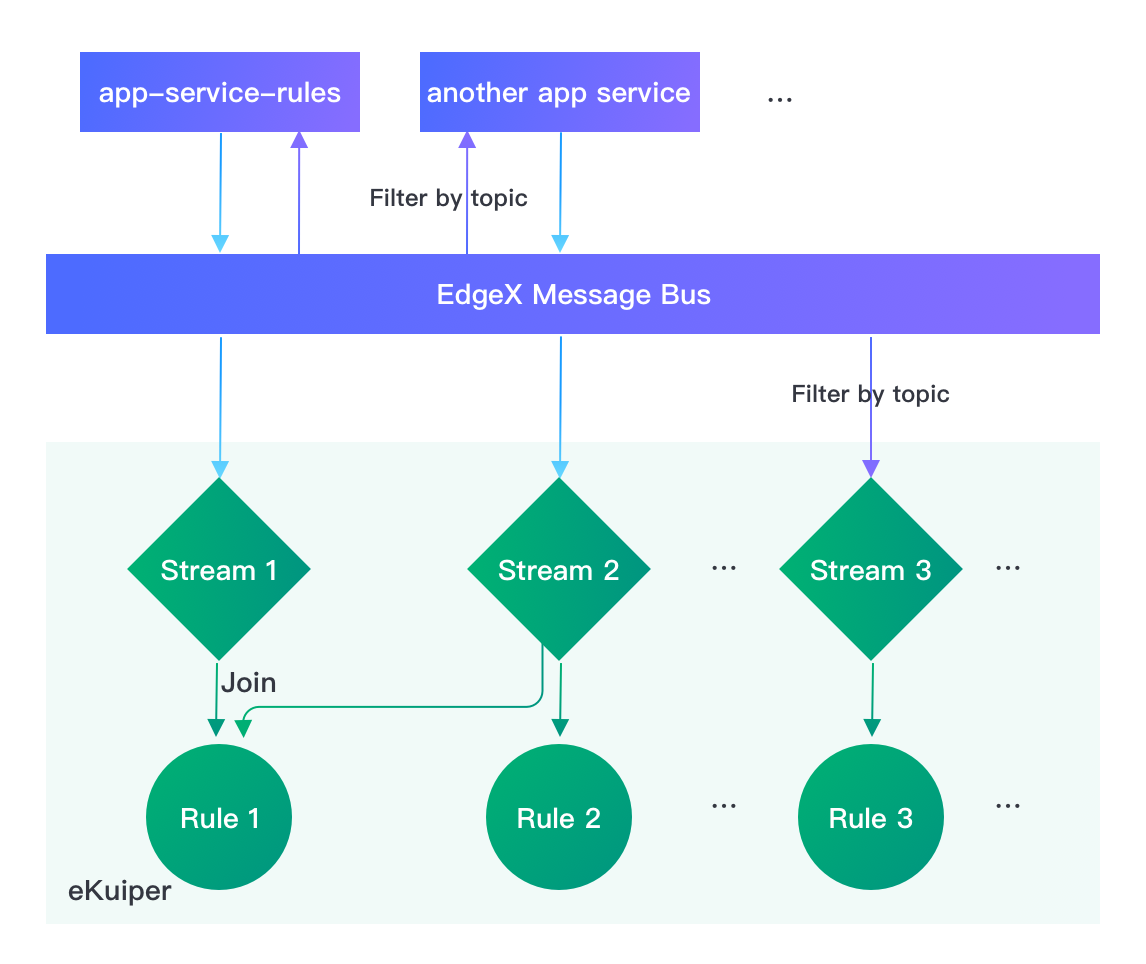
Both architectures exchange data through the message bus. The application service model enables upstream data enrichment and compression. The direct bus model bypasses intermediary services to minimize CPU overhead.
Two primary parameters control the connection model: topic and messageType.
Ingest from an Application Service
In the standard EdgeX Docker Compose deployment, the app-service-rules container acts as the upstream provider. It publishes telemetry to topic rules-events.
The rekuiper rules engine configures matching parameters using environment variables:
rulesengine:
  environment:
    EDGEX__DEFAULT__TOPIC: rules-events
When you define an EdgeX stream using default configurations, rekuiper consumes records from app-service-rules automatically.
Connect to a Custom Application Service
To connect to a custom application service:
- Set the publish topic on the application service using
TRIGGER_EDGEXMESSAGEBUS_PUBLISHHOST_PUBLISHTOPIC. - Configure
EDGEX__DEFAULT__TOPIConrulesengineto match the custom topic name:
app-service-rules:
  environment:
    TRIGGER_EDGEXMESSAGEBUS_PUBLISHHOST_PUBLISHTOPIC: new-rules-events

rulesengine:
  environment:
    EDGEX__DEFAULT__TOPIC: new-rules-events
Connect Directly to the EdgeX Message Bus
To bypass the application service, configure rekuiper to subscribe directly to EdgeX Core Data topics and set messageType to request.
For example, to filter data from Random-Integer-Device:
rulesengine:
  environment:
    EDGEX__DEFAULT__TOPIC: edgex/events/#/Random-Integer-Device/#
    EDGEX__DEFAULT__MESSAGETYPE: request
Create a stream using default settings:
CREATE STREAM edgeXAll() WITH (FORMAT="JSON", TYPE="edgex")The engine receives only records that match the device topic pattern.
Manage Multiple EdgeX Streams
In production environments, rules frequently target specific devices, profiles, or metric types. You can define multiple configuration profiles in etc/sources/edgex.yaml:
default:
  protocol: tcp
  server: localhost
  port: 1883
  topic: rules-events
  type: mqtt
  messageType: event

device_conf:
  topic: edgex/events/#/Random-Integer-Device/#
  messageType: request

another_app_service_conf:
  topic: new-rules-events
  messageType: event

int8_conf:
  topic: edgex/events/#/Random-Integer-Device/Int8
  messageType: request
Bind distinct streams to specific configuration profiles using CONF_KEY:
-- Ingests all events via the default profile
CREATE STREAM edgexAll() WITH (FORMAT="JSON", TYPE="edgex");

-- Ingests only Int8 readings using the int8_conf profile
CREATE STREAM edgexInt8(int8 bigint) WITH (FORMAT="JSON", TYPE="edgex", CONF_KEY="int8_conf");
Shared Source Instances
By default, each active rule instantiates a private source connector instance. To eliminate duplicate subscriptions and reduce memory overhead, configure the source as a shared instance using SHARED="true":
CREATE STREAM edgexAll() WITH (FORMAT="JSON", TYPE="edgex", SHARED="true");Multiple rules that reference edgexAll share a single message bus subscription thread.