Web Console User Journey and Operations Guide
This document describes the web console interface, security architecture, and operational journeys in rekuiper.
1. Security & Access Control Architecture
Is an Exposed Web Console Safe?
In industrial edge, IIoT, and manufacturing environments, an unprotected web console is a critical security vulnerability. If exposed without restriction on 0.0.0.0 or public networks, unauthorized actors could alter streaming pipelines, tamper with PLC actuators, install malicious binaries, or exfiltrate sensor telemetry.
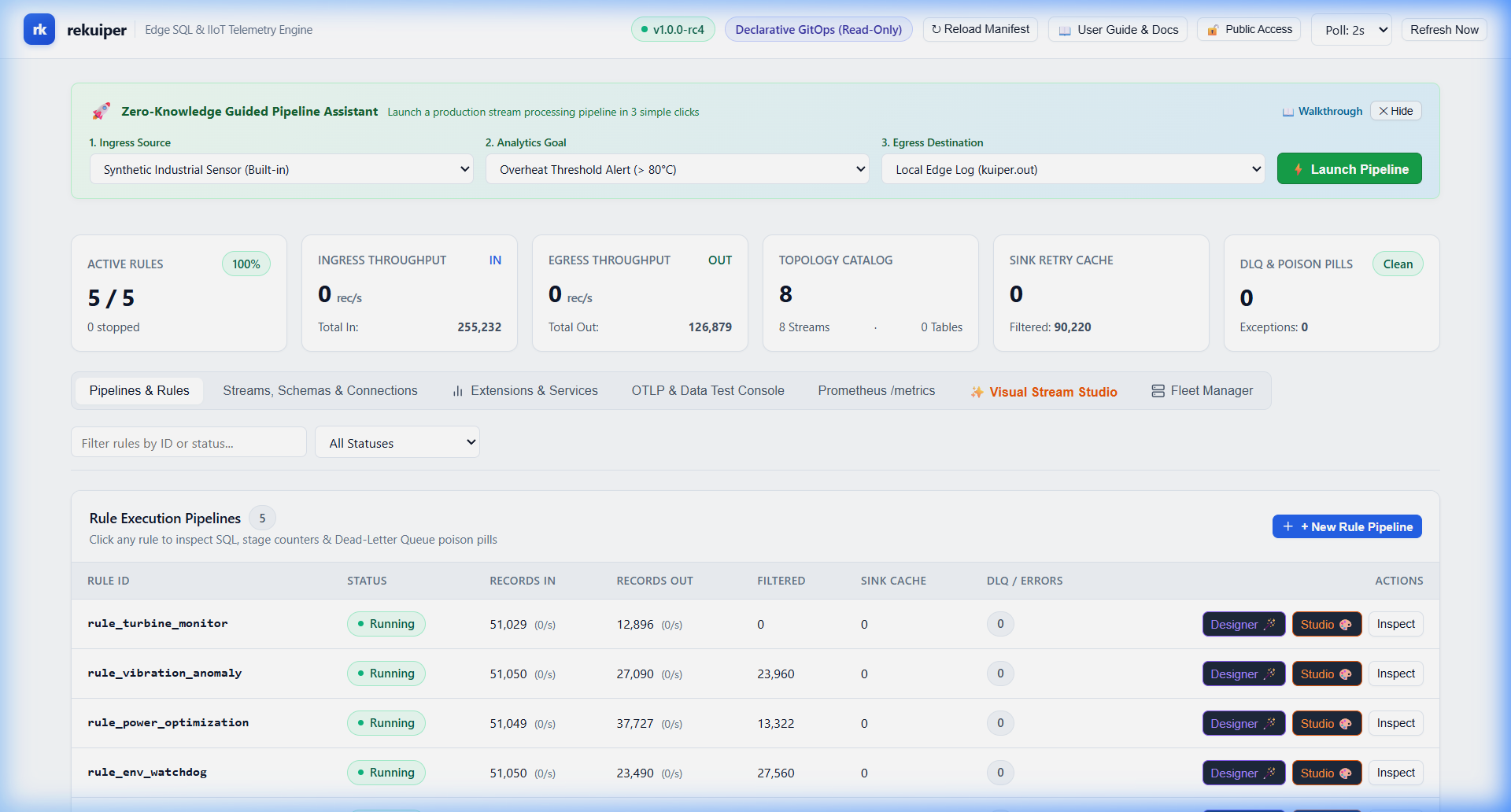
rekuiper secures the web console through a three-layer defense:
- Disabled by Default: The web console (
/ui) is disabled out-of-the-box. Operators must explicitly enable it with a command-line flag, environment variable, or configuration key. - IP Address & CIDR Allowlist Filtering: When enabled, operators can restrict console access exclusively to trusted workstations, engineering subnets, or VPN ranges (e.g.
127.0.0.1, 10.0.0.0/8). - Password, JWT, & Fleet Authentication: Operators can require a dedicated console password, RS256 JWT token, or shared fleet token to unlock administration functions.
Access Control Architecture Flow
The diagram below shows how connection requests are filtered before reaching the web console:
Security Configuration Procedures
1. Turn Console On or Off
By default, the web console is off. When disabled, visiting http://<host>:9081/ui returns HTTP 403 Forbidden with a security instruction message.
To enable the console:
- CLI Flag:bash
kuiperd --enable-ui # or short alias: kuiperd --ui - Environment Variable:bash
export REKUIPER_ENABLE_UI=true kuiperd - Configuration File (
etc/kuiper.yaml):yamlbasic: enableUi: true
2. Restrict Access via IP Allowlist & CIDR
To ensure only designated engineering subnets can connect to the web console:
- CLI Flag:bash
kuiperd --enable-ui --ui-allow-ip "127.0.0.1, 10.0.0.0/8, 192.168.1.100" - Environment Variable:bash
export REKUIPER_UI_ALLOW_IP="127.0.0.1, 192.168.1.0/24" - Configuration File (
etc/kuiper.yaml):yamlbasic: enableUi: true uiIpAllowlist: - "127.0.0.1" - "10.0.0.0/8" - "192.168.1.0/24"
Any connection originating from an unlisted IP address is immediately rejected with HTTP 403 Forbidden.
3. Set a Console Password or JWT Token
To prevent unauthorized access across open physical plant terminals:
- CLI Flag:bash
kuiperd --enable-ui --ui-password "FactoryPlantAdmin2026!" - Environment Variable:bash
export REKUIPER_UI_PASSWORD="FactoryPlantAdmin2026!" - Configuration File (
etc/kuiper.yaml):yamlbasic: enableUi: true uiPassword: "FactoryPlantAdmin2026!"
When set, the browser presents the Console Authentication Dialog. The operator enters the password or token once; the console securely caches the credential in sessionStorage and automatically signs all REST calls with Authorization: Bearer <token>.
2. Zero-Knowledge Guided Journeys
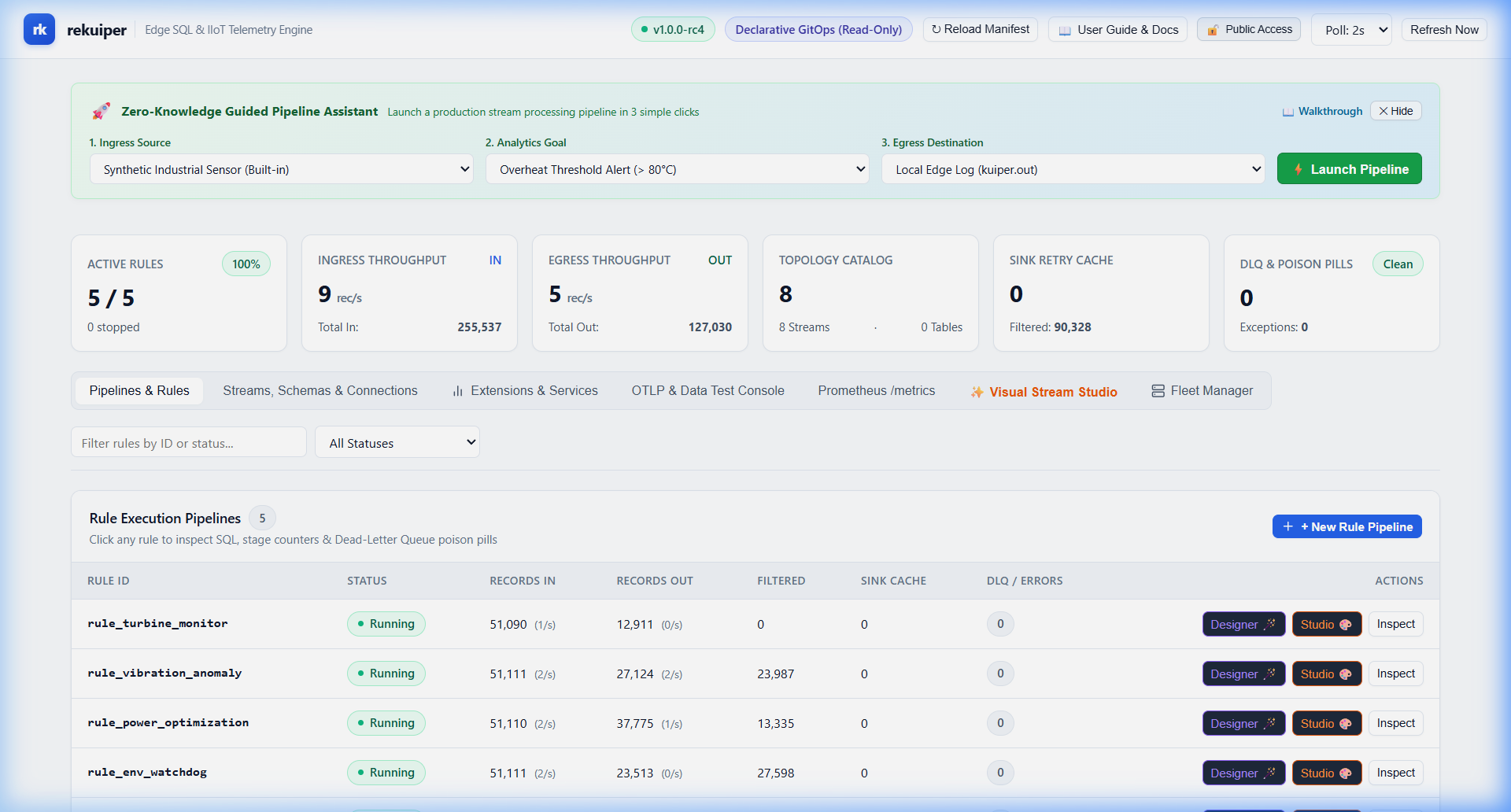
rekuiper is designed so that operators with zero prior knowledge of SQL syntax or stream processing internals can create, inspect, and deploy end-to-end industrial data pipelines.
Journey 1: 1-Click Guided Quick-Start Pipeline
The console features a top onboarding banner with three guided choices:
- Step 1: Choose Source:
[Synthetic Sensor 🪄]: Generates realistic temperature, vibration, and pressure telemetry inside the engine.[MQTT Telemetry]: Connects to standard MQTT broker topicfactory/+/telemetry.[Modbus PLC]: Connects to industrial Modbus TCP registers.[OPC-UA Server]: Ingests OPC-UA sensor node variables.
- Step 2: Choose Analytics Goal:
[Threshold Overheat Alert]: Dispatches an alert when temperature exceeds 80°C.[10-Second Moving Average]: Calculates rolling window aggregations.[Vibration Anomaly Spike]: Identifies equipment mechanical anomalies.
- Step 3: Route Output:
[Edge Log]: Prints formatted JSON to local system logs.[Cloud MQTT]: Publishes alerts toalerts/factory1.[REST Webhook]: Sends HTTP POST notifications to incident webhooks.
- Click 🚀 Launch Pipeline Now:
- The engine automatically provisions the stream schema, constructs the SQL query, registers the sinks, and starts the rule in one transaction.
Journey 2: Pipelines & Rules Studio
The Pipelines & Rules view (#tab-btn-rules) provides total control over continuous SQL streaming rules:
| Element / Button | Purpose |
|---|---|
| + New Rule Pipeline | Opens the Visual Rule Designer modal (#rule-designer-modal). |
| Rule Search Bar | Real-time filter across rule IDs and statuses. |
| Start (▶) | Activates an idle rule in the streaming engine. |
| Stop (⏹) | Pauses stream consumption without deleting checkpoints. |
| Restart (↻) | Recycles operator state and restarts processing. |
| Topology (📊) | Visualizes the operator DAG with live record rates. |
| DLQ Errors (⚠) | Inspects poison-pill messages and dead-letter queues. |
| Delete (🗑) | Safely removes the rule pipeline after confirmation. |
Visual Rule Designer Workflow
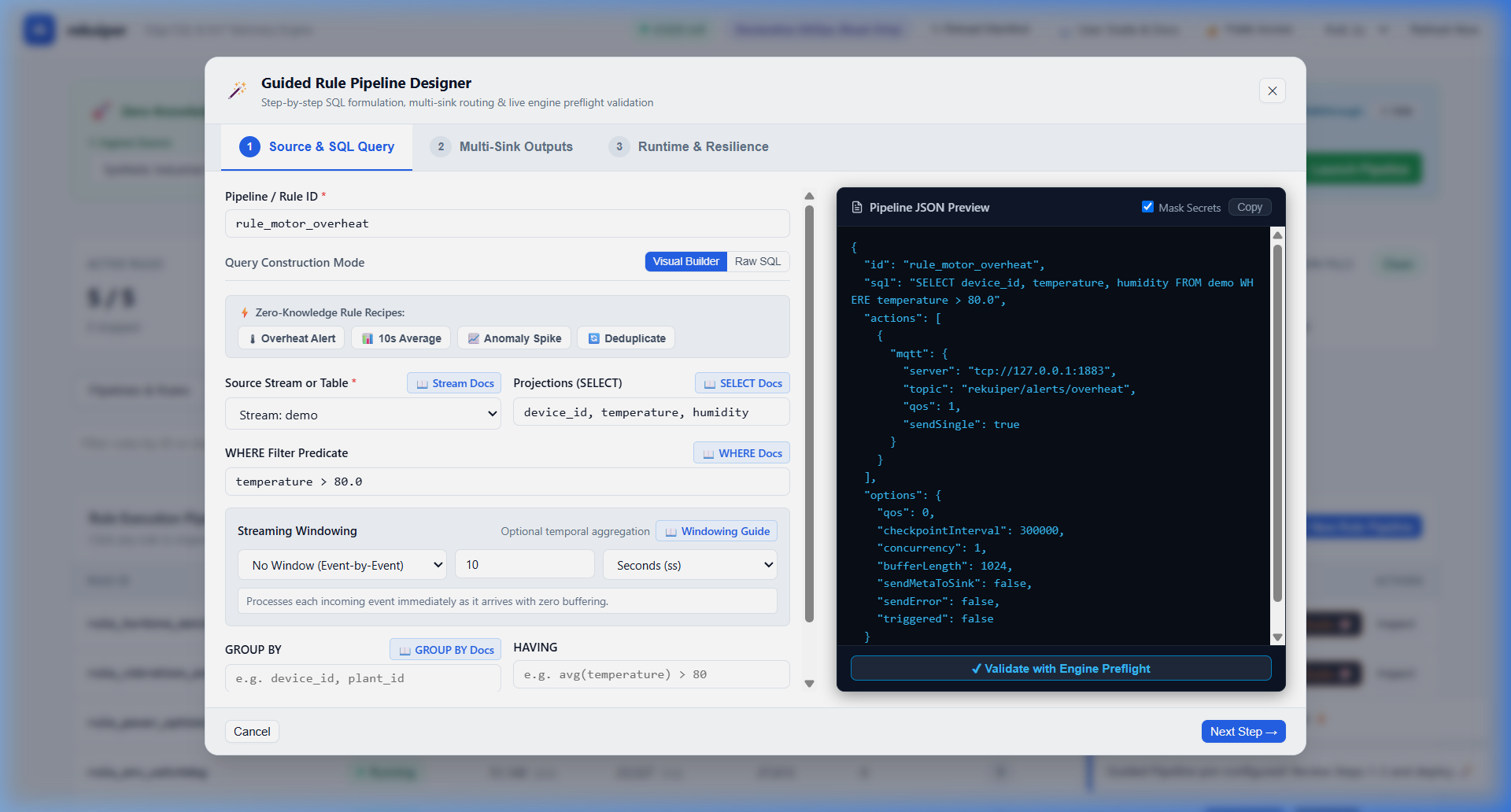
- Rule ID: Unique identifier for the pipeline (e.g.
rule_motor_overheat_alert). - Zero-Knowledge Rule Recipes:
- Click 🌡 Overheat Alert: Pre-loads temperature threshold alert queries.
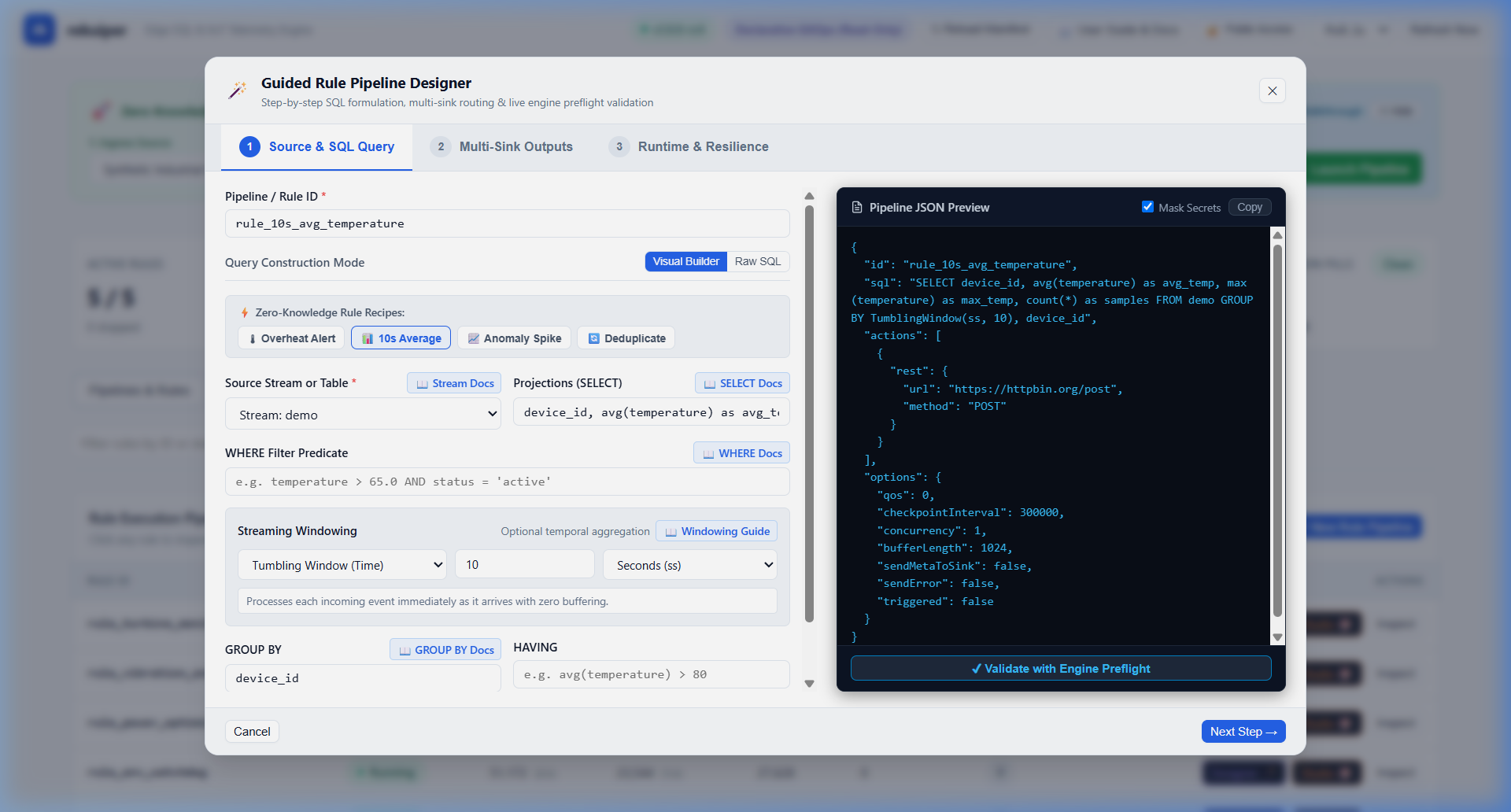
- Click 📊 10s Average: Pre-loads rolling 10-second tumbling window aggregations.
- Click 📈 Anomaly Spike: Pre-loads lag-based vibration difference calculations.
- Click 🔄 Deduplicate: Pre-loads
had_changed()state-change filters.
- Interactive Clause Palette & Stream Field Pills:
- Click any Stream Field Pill (
[temperature],[humidity],[device_id]) to append projections without typing field names. - Click Window Selection to choose Tumbling, Hopping, or Session windowing strategies with plain-language explanations.
- Click any Stream Field Pill (
- Multi-Sink Outputs:
- Add multiple egress targets (MQTT, Webhook, File, Kafka) with custom payload templates.
- Runtime & Resilience:
- Configure QoS (0: At Most Once, 1: At Least Once, 2: Exactly Once), ring buffer capacities, and checkpoint intervals.
- Click Deploy Rule Pipeline 🚀 to execute preflight verification and activate the rule.
Journey 3: Streams, Schemas & Connections
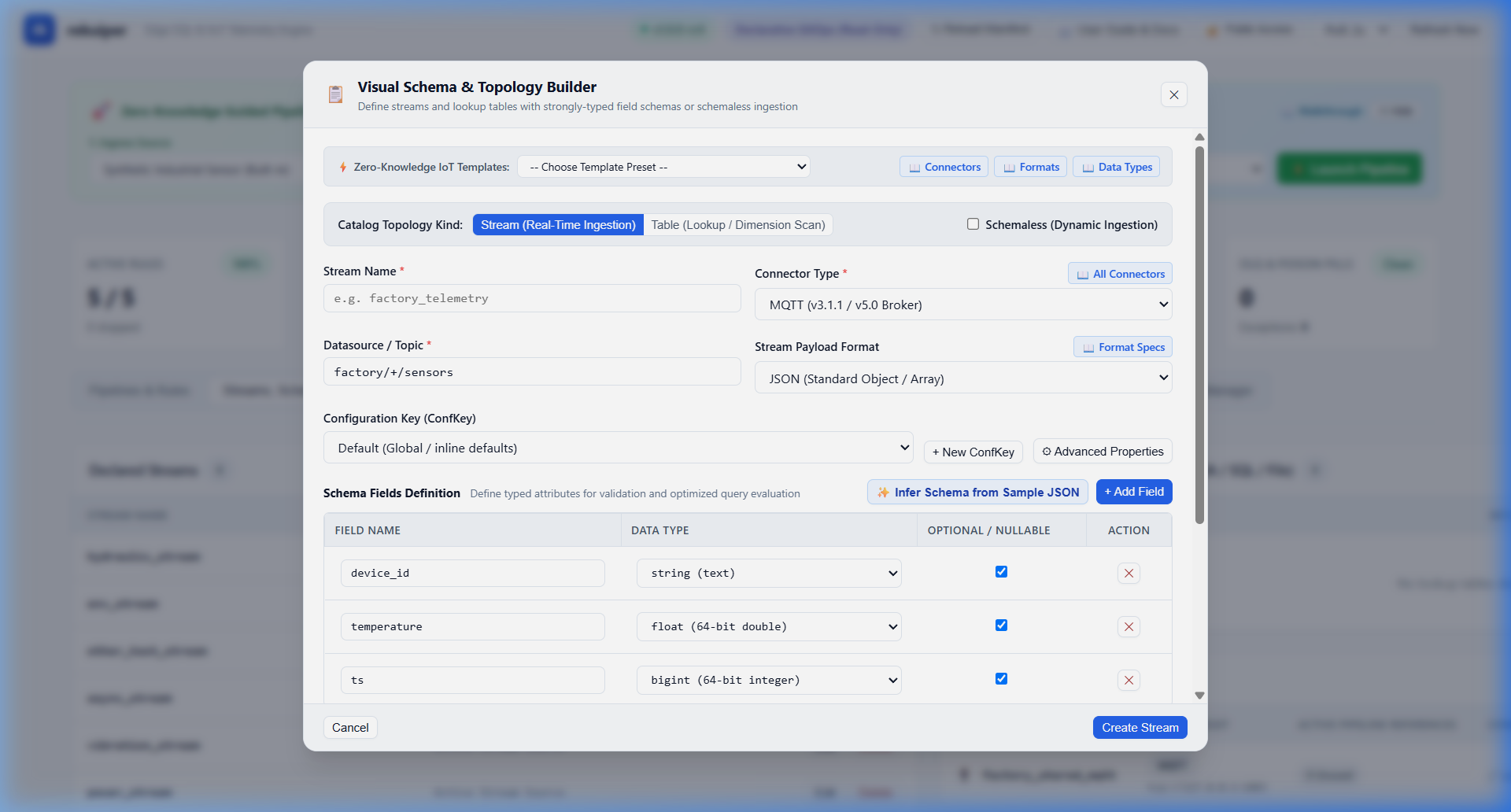
The Streams, Schemas & Connections catalog (#tab-btn-catalog) manages ingress sources and data contracts:
| Feature / Button | Zero-Knowledge Capability |
|---|---|
| + New Stream / Table | Opens the Visual Schema Builder (#stream-designer-modal). |
| ⚡ IoT Stream Templates | Instantly configures Temperature Sensor, Modbus PLC, OPC-UA Tags, or CANbus Vehicle. |
| ✨ Infer from Sample JSON | Paste any sample IoT JSON payload; the builder automatically detects fields and data types (float, bigint, string, boolean, struct). |
| + Add Field Row | Adds structured columns with type dropdowns and nullable toggles. |
| Autofill from Protobuf 🪄 | Reads registered .proto contracts and extracts fields into SQL types. |
| ConfKey Manager | Manages shared reusable connection credentials (MQTT brokers, Kafka clusters, Modbus PLCs). |
The diagram above illustrates the real-time inference workflow: pasting arbitrary JSON immediately maps payload keys into strongly typed schemas without SQL formulation.
Journey 4: Extensions, JavaScript UDF Studio & Services
The Extensions & Services hub (#tab-btn-plugins) unlocks unlimited edge customization:
- Native & Wasm Plugins (
#ext-panel-plugins):- Install custom sources, sinks, and Wasm bytecode modules.
- Inspect loaded symbols, target architecture, and binary memory layouts.
- JavaScript UDF Studio (
#ext-panel-udfs):- Author custom transformation functions in QuickJS without installing a compiler.
- Select template presets (Celsius to Fahrenheit, JSON Field Filter, Running Mean).
- Interactive Preflight Sandbox: Enter test inputs (
[25.0]), click ⚡ Run Test in Sandbox, and observe outputs and microsecond execution latency metrics before deploying. - 221+ SQL Function Palette: Search and copy standard SQL functions across 14 categories.
- External Services & RPC Hub (
#ext-panel-services):- Connect external microservices via gRPC or REST.
- Call remote methods directly inside SQL queries (
SELECT ai_service.detect_defect(image) FROM camera_stream).
- File Storage & Artifacts (
#ext-panel-uploads):- Upload TLS certificates, Protobuf definitions, and ONNX models.
- 1-click clipboard button copies the absolute edge path (
data/uploads/...) for instant referencing.
- Data Backup & Migration (
#ext-panel-backup):- 1-click JSON snapshot download (
/data/export). - Declarative GitOps YAML bundle download (
/v2/data/export). - Drag-and-drop system restore engine.
- 1-click JSON snapshot download (
Journey 5: Fleet Manager & Observability
The Fleet Manager view (#tab-btn-fleet) provides central command over distributed edge gateways:
- Fleet Top: Displays CPU usage, memory footprint, active rules, DLQ health badges, and network status for all connected nodes.
- Rollout Engine: Dispatches declarative pipeline snapshots across plant fleets.
- Immutable Audit Trail: Chronological event log of administrative mutations persisted in SQLite KV store.
Journey 6: Ingestion & Telemetry Test Console
The OTLP & Data Test Console (#tab-btn-ingest) allows operators to validate pipelines with live payloads:
- Select pre-configured endpoints:
POST /v1/metrics,POST /v1/logs,POST /v1/traces, orPOST /data/{stream}. - Click Send Payload to inject test telemetry and verify continuous SQL transformations in real time.
3. Contextual In-UI Documentation Links
To ensure operators never need to search externally, every interactive component in the web console provides direct contextual deep links to the documentation:
| UI Location | In-Console Trigger | Documentation Target | Purpose |
|---|---|---|---|
| Topbar Navigation | 📖 User Guide & Docs | [Web Console User Guide](file:///docs/en_US/guide/ui/web_console_user_guide.md) | Full user manual, security architecture, and operational journeys |
| Topbar Navigation | 🔒 Console Security Status | [Security & Access Control Architecture](file:///docs/en_US/guide/ui/web_console_user_guide.md#security--access-control-architecture) | Port exposure protection, IP allowlists, and credentials |
| Rule Designer | 📖 Rule Docs | [Rule Overview](file:///docs/en_US/guide/rules/overview.md) | SQL syntax, temporal windows, and multi-sink actions |
| Rule Designer | 📖 Window Docs | [Window Functions](file:///docs/en_US/guide/rules/overview.md#window-functions) | Tumbling, Hopping, Session, and Counting window semantics |
| Stream Designer | 📖 Stream Docs | [Stream Overview](file:///docs/en_US/guide/streams/overview.md) | Data sources, connectors, payload formats, and DDL syntax |
| ConfKey Modal | 📖 ConfKey Docs | [Data Sources Configuration](file:///docs/en_US/guide/sources/overview.md) | Reusable connector profiles, TLS options, and credentials |
| Schema Registry | 📖 Schema Docs | [Schema Registry Guide](file:///docs/en_US/guide/schemas/schema_registry.md) | Protobuf contracts, Custom formats, and AST validation |
| Plugins & UDF Hub | 📖 Plugin Docs | [Plugins & Services Hub](file:///docs/en_US/guide/plugins/plugins_and_services_hub.md) | Wasm modules, JavaScript UDFs, and external RPC services |
| Fleet Top Bar | 📖 Fleet Docs | [Fleet Deployment Guide](file:///docs/en_US/guide/fleet/fleet_deployment_and_canary.md) | Health-gated rollouts, Canary verification, and device monitoring |