EdgeX Rule Engine Tutorial
This tutorial describes how to integrate rekuiper with EdgeX Foundry to process real-time telemetry events from the EdgeX message bus.
Integration Architecture
In EdgeX Foundry, microservices communicate through an internal message bus (such as MQTT or ZeroMQ). rekuiper connects directly to this message bus to process streaming data:
- Source: Ingests
EventandReadingpayloads from EdgeX message bus topics. - SQL Engine: Filters, transforms, enriches, and computes aggregates over streaming data.
- Sink: Routes processed alerts and summaries to downstream brokers, databases, REST endpoints, or back to the EdgeX message bus.
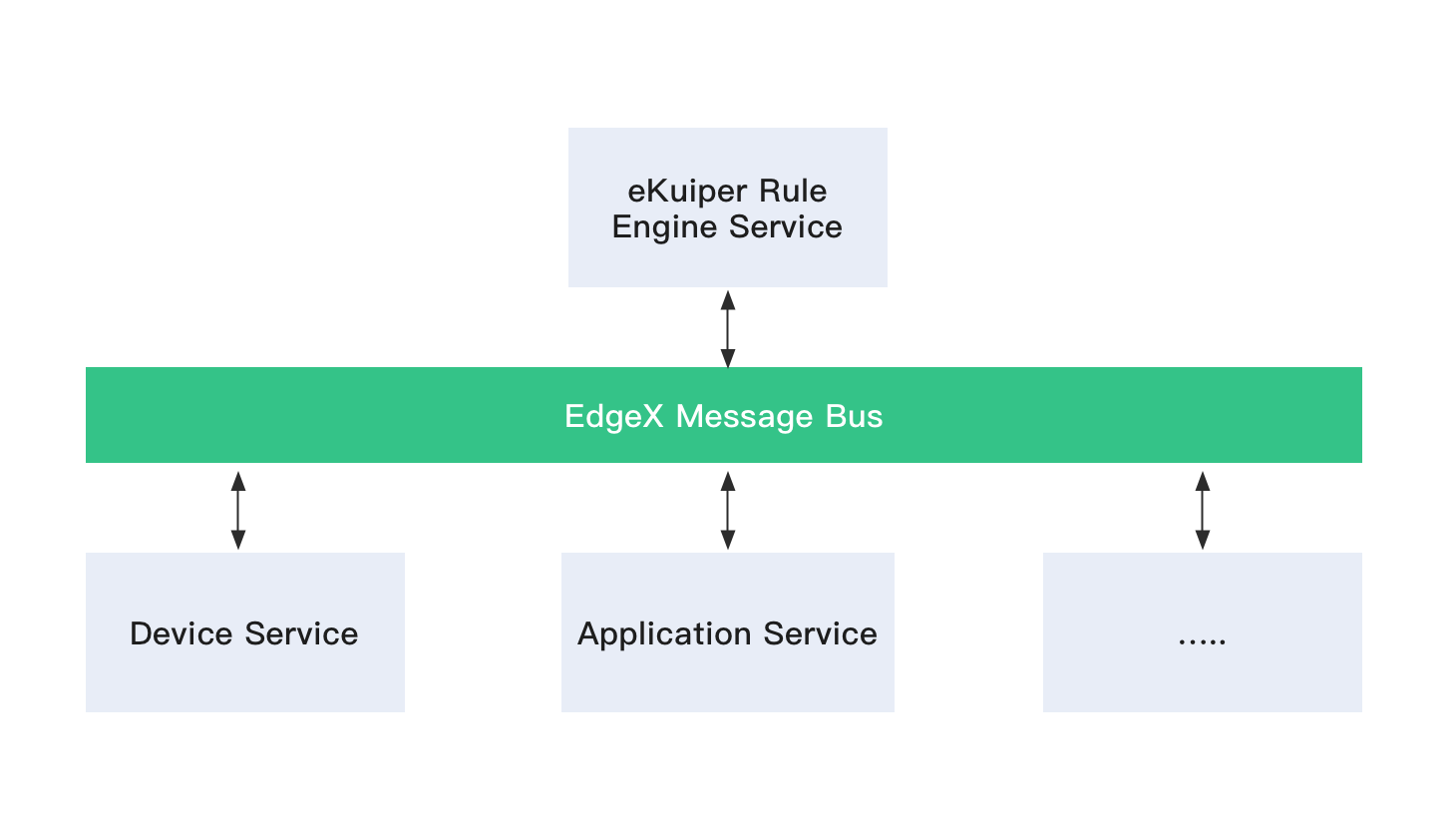
Automated Data Type Mapping
EdgeX payloads describe schema attributes and data types inside event headers. Therefore, you do not need to define explicit column schemas when creating an EdgeX stream. rekuiper automatically maps EdgeX data types to SQL types at runtime. For conversion details, refer to the EdgeX Source Guide.
EdgeX Version Compatibility
- EdgeX v4 Support: Since eKuiper version 2.1.0, the default message bus is MQTT. Redis message bus support is deprecated.
- EdgeX v3 Support: Supported in eKuiper version 1.11.
- EdgeX v2 Support: Supported in eKuiper version 1.2.1. The
Core contract Servicerequirement andserviceServerconfiguration are removed. Refer to EdgeX Metadata Changes.
Walkthrough: Process Sensor Telemetry
This walkthrough uses the EdgeX device-virtual service to generate sample telemetry and process readings using rekuiper.
1. Start EdgeX in Docker
Download Docker Compose descriptors from the EdgeX repository and start the containers:
docker-compose -f ./docker-compose-no-secty.yml up -d --buildVerify that all services are running:
docker ps2. Configure Shared Connections
To reuse broker credentials across sources and sinks, inject environment variables into the rules engine service in docker-compose.yml:
environment:
  CONNECTION__EDGEX__MQTTMSGBUS__OPTIONAL__CLIENTID: kuiper-rules-engine
  CONNECTION__EDGEX__MQTTMSGBUS__OPTIONAL__KEEPALIVE: "500"
  CONNECTION__EDGEX__MQTTMSGBUS__PORT: "1883"
  CONNECTION__EDGEX__MQTTMSGBUS__PROTOCOL: tcp
  CONNECTION__EDGEX__MQTTMSGBUS__SERVER: edgex-mqtt-broker
  CONNECTION__EDGEX__MQTTMSGBUS__TYPE: mqtt
Refer to Connection Reusability.
3. Create an EdgeX Stream
NOTE
rekuiper serves the complete REST API concurrently on both port 9081 (standard eKuiper port) and port 59720 (EdgeX Foundry application service port). You can send REST queries to either port with full bidirectional parity.
Option A: Create via REST API
You can use port 59720 (EdgeX convention) or port 9081:
curl -X POST \
  http://localhost:59720/streams \
  -H 'Content-Type: application/json' \
  -d '{
  "sql": "create stream demo() WITH (FORMAT=\"JSON\", TYPE=\"edgex\")"
}'
Option B: Create via CLI
Enter the container shell:
docker exec -it edgex-kuiper /bin/shExecute the creation command:
bin/kuiper create stream demo '() WITH (FORMAT="JSON", TYPE="edgex")'Default message bus parameters reside in etc/sources/edgex.yaml:
default:
  protocol: tcp
  server: edgex-mqtt-broker
  port: 1883
  topic: edgex/rules-events
  type: mqtt
  messageType: event
4. Create and Deploy a Processing Rule
Create a rule that routes all incoming events to an MQTT topic and writes execution traces to the log:
Option A: Deploy via REST API
curl -X POST \
  http://localhost:59720/rules \
  -H 'Content-Type: application/json' \
  -d '{
  "id": "rule1",
  "sql": "SELECT * FROM demo",
  "actions": [
    {
      "mqtt": {
        "server": "tcp://127.0.0.1:1883",
        "topic": "result",
        "clientId": "demo_001"
      }
    },
    {
      "log": {}
    }
  ]
}'
Option B: Deploy via CLI
Create rule.txt:
{
  "sql": "SELECT * from demo",
  "actions": [
    {
      "mqtt": {
        "server": "tcp://127.0.0.1:1883",
        "topic": "result",
        "clientId": "demo_001"
      }
    },
    {
      "log": {}
    }
  ]
}
Deploy the rule file:
bin/kuiper create rule rule1 -f rule.txt5. Monitor Output and Inspect Rule Status
Subscribe to the MQTT output topic using mosquitto_sub:
mosquitto_sub -h 127.0.0.1 -t resultInspect the container logs:
docker logs -f edgex-kuiperQuery rule runtime metrics from the CLI:
bin/kuiper getstatus rule rule1Response sample:
{
  "source_demo_0_records_in_total": 29,
  "source_demo_0_records_out_total": 29,
  "source_demo_0_exceptions_total": 0,
  "source_demo_0_process_latency_ms": 0,
  "sink_mqtt_0_0_records_in_total": 21,
  "sink_mqtt_0_0_records_out_total": 21,
  "sink_mqtt_0_0_exceptions_total": 0,
  "sink_mqtt_0_0_process_latency_ms": 0
}
Zero-Trust Security with OpenZiti Overlay
In hostile or untrusted edge environments (such as factory floors, public clouds, or remote wind turbines), exposing EdgeX and rekuiper management ports to local networks introduces attack surfaces. OpenZiti provides a zero-trust network overlay that eliminates listening ports on public interfaces.
Architecture
[EdgeX Microservices] <---> [rekuiper (Port 59720)]
         |                           |
         +-------------+-------------+
                       |
             [ziti-edge-tunnel]
                       | (mTLS Over Port 443 Only)
             [OpenZiti Edge Fabric]
                       |
[Authorized Operator / Cloud]- Dark Services: Neither EdgeX nor rekuiper exposes host ports (
59720,1883,59880). All traffic is intercepted locally byziti-edge-tunnel. - Mutual TLS (mTLS): Every connection through the overlay is cryptographically authenticated with per-workload identities.
- Least Privilege: Only operators with valid OpenZiti JWT service policies can access the rekuiper REST API or query EdgeX metrics.
Step-by-Step Configuration
1. Enroll the Edge Identity
Generate an enrollment token for rekuiper in the OpenZiti Controller:
ziti edge create identity device "rekuiper-edge-01" -a "edgex-nodes" -o rekuiper.jwtEnroll the token into the persistent storage volume:
ziti-edge-tunnel enroll -j rekuiper.jwt -i /ziti-edge-tunnel/rekuiper-edge.json2. Define the Zero-Trust Service
Create an OpenZiti service intercepting the rekuiper management API:
ziti edge create config rekuiper-host-cfg host.v1 '{"protocol":"tcp", "address":"edgex-kuiper", "port":59720}'
ziti edge create config rekuiper-intercept-cfg intercept.v1 '{"protocols":["tcp"], "addresses":["kuiper.edgex.ziti"], "portRanges":[{"low":59720, "high":59720}]}'
ziti edge create service rekuiper-service --configs rekuiper-host-cfg,rekuiper-intercept-cfg
3. Run with Docker Compose
Deploy the zero-trust stack using deploy/docker/docker-compose-edgex-openziti.yml:
docker-compose -f deploy/docker/docker-compose-edgex-openziti.yml up -dVerify that no host ports are bound (0.0.0.0:*) while rekuiper remains fully accessible over the zero-trust overlay address kuiper.edgex.ziti:59720.