Portable Plugins
Portable plugins provide an out-of-process extension mechanism that supports multiple programming languages. Like native plugins, portable plugins support custom source, sink, and function extensions.
Architecture
Portable plugins execute as independent processes outside the main rekuiper process:
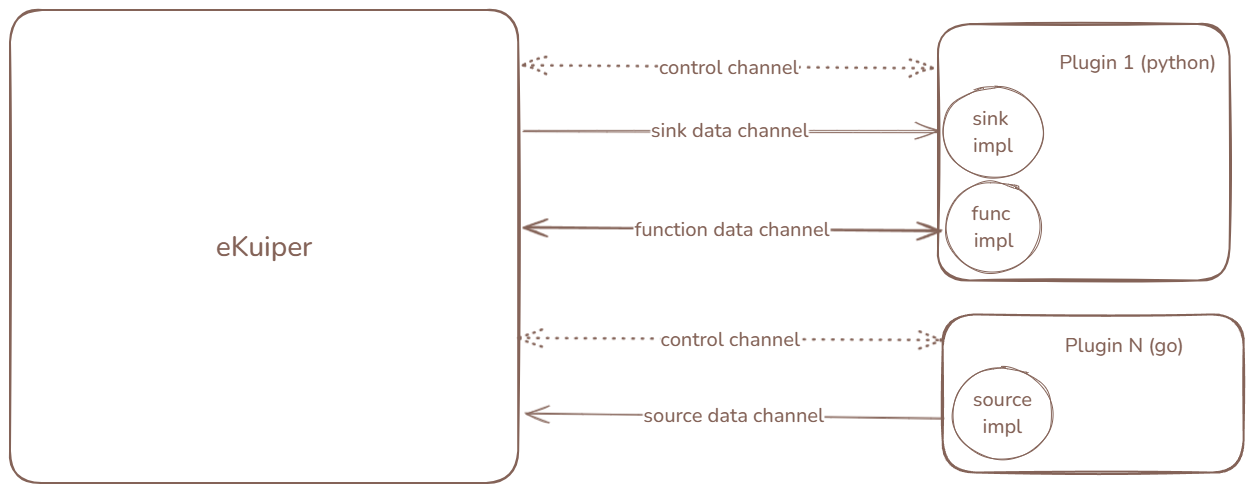
- Inter-Process Communication: The plugin process communicates with the engine through nanomsg IPC sockets.
- Process Lifecycle: The engine starts plugin processes upon installation or system startup and maintains a control channel. When a rule uses an extension symbol, the engine establishes dedicated data channels.
- Hot Updates: Nanomsg channels support automatic reconnection. When you update a plugin binary, the new process connects to existing channels without requiring rule restarts.
Development
Developing a portable plugin involves three steps:
- Implement extension symbols (sources, sinks, functions) using a supported SDK.
- Implement the main entry program to serve the symbols.
- Package the executable and metadata into a zip archive.
rekuiper provides dedicated SDKs:
Debugging with the Test Server
You can test portable plugins in isolation by using the standalone test server under tools/plugin_test_server:
Configure
testingPluginto match your plugin metadata.Start the test server.
Launch your plugin process in debug mode and complete the handshake.
Test symbol lifecycle operations through the REST API:
shellcurl -X POST http://localhost:33333/symbol/start \ -H "Content-Type: application/json" \ -d '{ "symbolName": "pyjson", "meta": { "ruleId": "rule1", "opId": "op1", "instanceId": 1 }, "pluginType": "source", "config": {} }'
Packaging
Package plugin files into a zip archive with this structure:
{pluginName}.json: Metadata descriptor matching the plugin name.- Executable binary or script.
- Subdirectories:
sources/,sinks/, andfunctions/containing symbol metadata. - Optional scripts (such as
install.sh) and dependencies.
Example metadata descriptor {pluginName}.json:
{
  "version": "v1.0.0",
  "language": "go",
  "executable": "mirror",
  "sources": [
    "random"
  ],
  "sinks": [
    "file"
  ],
  "functions": [
    "echo"
  ]
}
For Python plugins using Conda environments, specify the environment properties:
{
  "version": "v1.0.0",
  "language": "python",
  "executable": "pysam.py",
  "virtualEnvType": "conda",
  "env": "myenv"
}
Management
- File System Autoload: Place uncompressed plugin directories under
plugins/portables/{pluginName}and configurations underetc/. - API Management: Install and monitor plugins through the REST API or the CLI.
Limitations
- Context Methods: State storage and shared connection APIs are not available for portable plugins.
- Validation: Function arguments cannot be validated against the SQL AST prior to execution. Sinks receive pre-encoded JSON byte payloads.